
परिचय
💡 Automate Discord Subscriptions with Lightning Network! ⚡ Manage roles and memberships easily and effectively.
⚡ Lightning Role Bot
Is the ultimate solution for managing Discord subscriptions using the Lightning Network! 🚀
🛠️ Key Features:
🎭 Role Management:
- Automatically assign roles to paying members.
🌩️ Lightning Network Payments:
- Seamless integration with Lightning wallets.
📜 Detailed Logs:
- Keep track of activities in a dedicated log channel.
⏰ Automatic Monitoring:
- Check expired subscriptions and send renewal notifications.
🔧 Simple Setup:
- Easy-to-use commands like
/ln_admin.
🧑💻 Perfect for servers looking to:
- Monetize through subscriptions.
- Provide a seamless and automated subscription experience.
- Integrate with Lightning wallets, like Wallet of Satoshi.
📖 How to Use Lightning Role Bot
Step 1: Accept Terms and Conditions
After installing the bot, you must accept the terms and conditions before using it.
The terms will automatically appear when you type any command.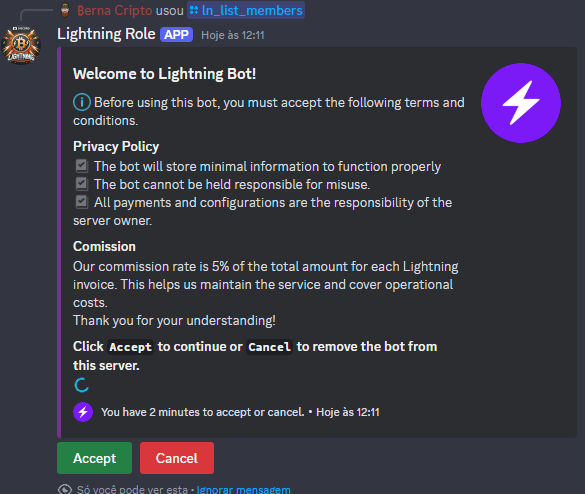
Once you accept, the bot will confirm that the terms have been accepted, and you can proceed to use its features.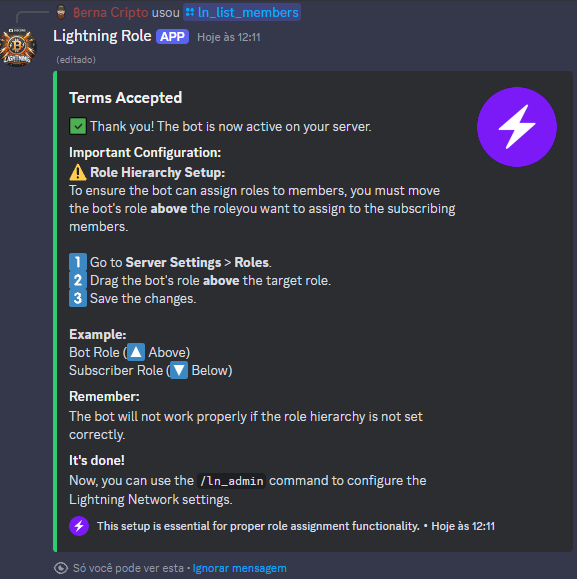
Step 2: Configure the Bot with /ln_admin
Use the /ln_admin command to configure the bot for your server. This command will let you set the Lightning wallet, subscription value, log channel, and the role that the bot will manage.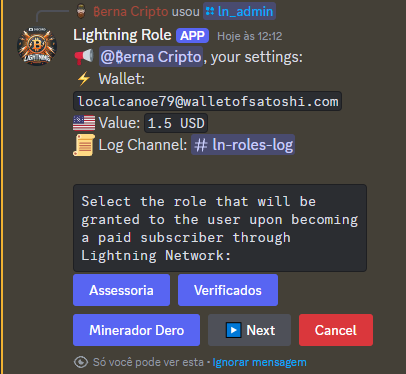
Important:
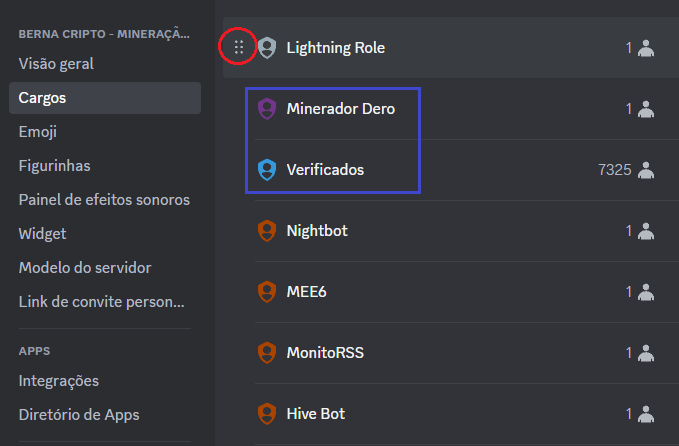
The Lightning Role bot's role must be placed above the role it will assign to users. This ensures proper permissions to assign roles.
The target role cannot be an externally managed role (e.g., roles provided by YouTube or Twitch integrations).
To adjust the role hierarchy:
Go to Server Settings > Roles.
Drag the Lightning Role bot's role above the subscriber role.
Save the changes.
After selecting and confirming the configuration, the bot will save the settings.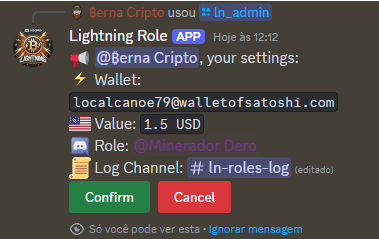
Once the settings are saved, the bot will display a confirmation message.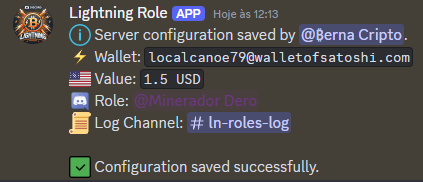
Step 3: User Subscription with /ln_subscribe
Users can subscribe by running the /ln_subscribe command, where represents the number of months for the subscription.
Example:
/ln_subscribe 1 to subscribe for 1 month.When the user subscribes, the bot will generate a Lightning invoice and a QR code for payment.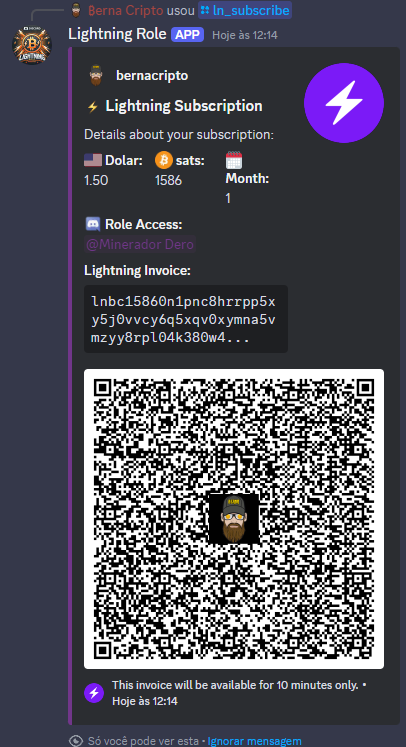
After payment is made, the bot will confirm the payment and assign the configured role to the user.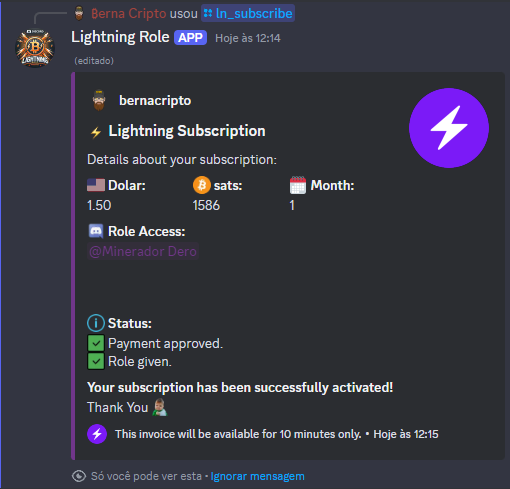
Step 4: Renewing an Active Subscription
If a user wants to extend their subscription before it expires, they can use the same /ln_subscribe command.
The bot will calculate the new expiration date by adding the selected duration to the current expiration.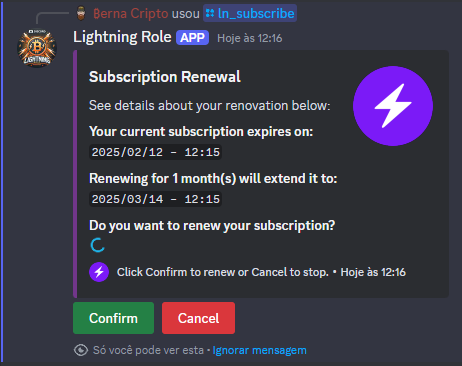
Once the renewal payment is made, the bot will confirm the extension of the subscription.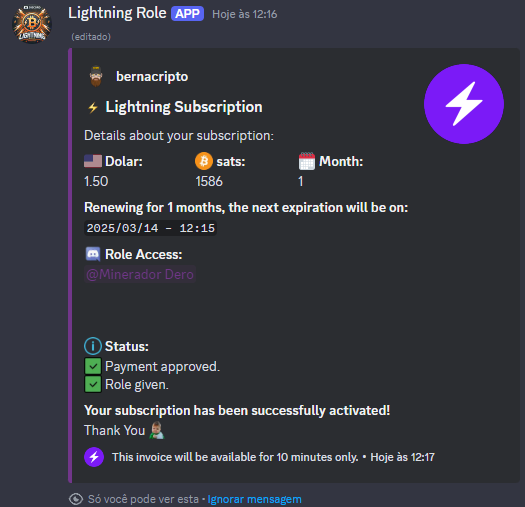
📜 Transparent Logging for Administrators
The bot ensures full transparency by providing an exclusive log channel that only the server administrators and the bot can view.
This channel, configured during the /ln_admin setup, will display detailed logs of all transactions, including:
- Subscription requests and renewals.
- Payment hashes and Lightning invoices.
- Payment confirmation and status updates.
- Commission calculations and net values sent to the configured wallet. (5%)
- Role assignments for subscribed users.
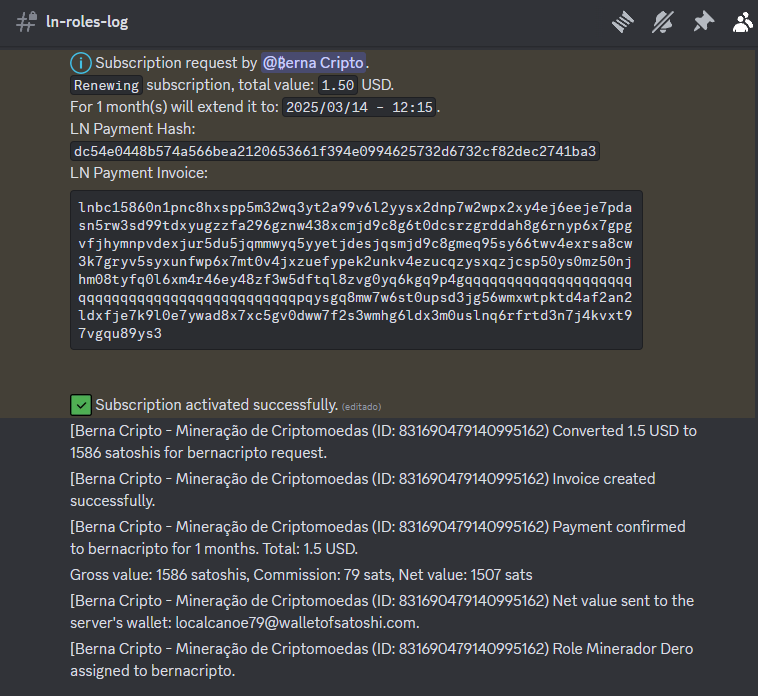
This log channel helps administrators keep track of all activities related to subscriptions and payments in a clear and organized manner.
It ensures that all actions performed by the bot are visible and traceable, maintaining accountability and transparency.
🚀 Ready to Start?
Add the Lightning Role Bot to your server and automate everything with seamless Lightning Network payments!
भाषाएँ
- English
समीक्षाएँ
लॉग इन — समीक्षा लिखने के लिए साइन इन करें।
अभी कोई समीक्षा नहीं — अपना अनुभव साझा करने वाले पहले व्यक्ति बनें।
वोट आँकड़े
पिछले 30 दिनों में इस डायरेक्टरी पर दर्ज।
पिछले 30 दिन
- वोट
पिछले 30 दिनों में यहाँ कोई वोट नहीं।


