
概要
AI Discord assistant that researches, builds, automates and manages your server in one chat, with moderation, tickets, analytics and more.

Qreate
The safety-first AI operating system for Discord communities
Qreate is a multimodal AI assistant for understanding, building, automating and operating Discord communities.
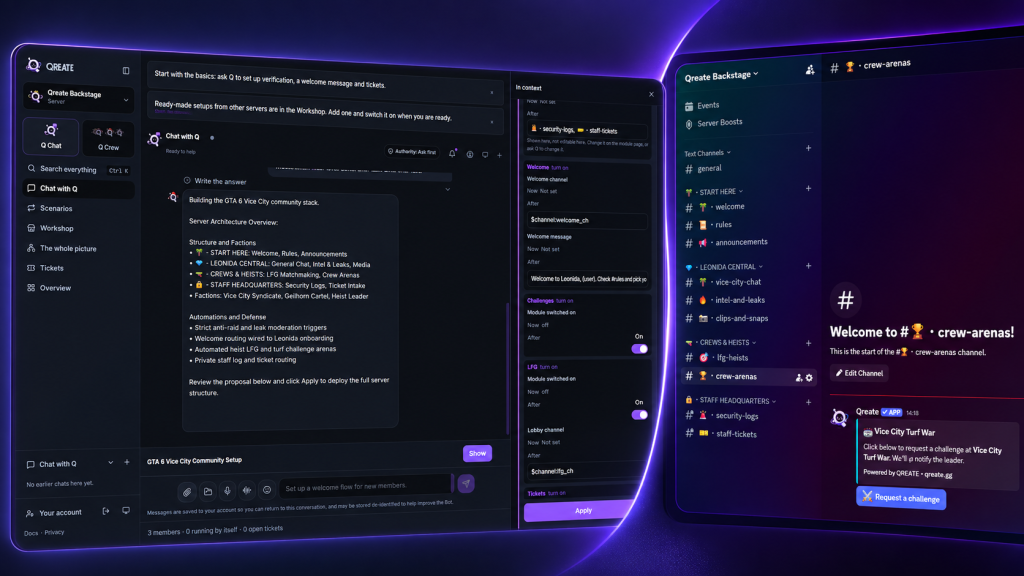
Q reads the server you already have, researches what you need, prepares the work and shows you what will change before anything is applied.
Ask → Research → Draft → Review → Approve → Launch
Start free
•
Join our support server
•
Read the documentation
AI with a safety layer, not a black box
Qreate is built to make AI useful without giving it uncontrolled power over your community.
- No Discord Administrator permission required
- Access limited to servers you administer
- Authorization checked on every request
- Proposed changes shown before execution
- Plans stored so approval applies to the exact reviewed actions
- No silent plan substitution by connected AI clients
- Sensitive and destructive operations remain protected
- Discord role hierarchy and server permissions still apply
You decide how much authority Q receives:
Advisor → Plan → Ask First → Trusted → Admin
Qreate gives your team the speed of AI while keeping responsibility and final control with the people who run the community.
Q Chat: one conversation for your whole server
Tell Q what outcome you want. Q combines your request with the context of your actual Discord server and helps determine what needs to happen next.
Ask Q to build a support system, research Discord changes, create onboarding, analyse your server, write an announcement or generate matching community artwork.
- Understand your existing server structure, roles, permissions and systems
- Research current information on the web
- Work with uploaded images and files
- Generate banners, icons, emojis and community visuals
- Write rules, announcements and publish-ready content
- Configure supported server systems and workflows
- Build automations and recurring operations
- Inspect settings and identify configuration problems
- Read server activity and explain what is happening
- Prepare visible proposals before changes are applied
Complete Discord community management
Qreate brings the work traditionally split between multiple Discord bots and dashboards into one connected platform.
- 🛡️ Moderation and AI-assisted moderation
- ✅ Verification and member onboarding
- 👋 Welcome and goodbye experiences
- 🎭 Roles and permissions
- 🎫 Tickets and member support
- 📝 Forms and applications
- ⚙️ Automations and scheduled messages
- ⏰ Reminders and recurring actions
- ⭐ Leveling, reputation and community progression
- 🎨 Reaction roles and interactive panels
- 🎉 Giveaways, polls and community activities
- 📢 Announcements and publishing workflows
- 🧰 Custom commands
- 📈 Server analytics and activity insights
- 📋 Logging and administrative operations
- 🖼️ Community media and external integrations
Everything works with the same server context instead of behaving like a collection of disconnected bots.

Build, run and improve
Most AI Discord tools focus on the initial setup. Qreate is designed for the entire lifecycle of a community.
Build the foundation.
Run recurring operations.
Improve the member experience over time.
Continue using Q Chat and Q Crew as your community evolves instead of rebuilding your systems from scratch.
Q Crew: direct control when you need it
Q Chat gives you a natural-language way to work. Q Crew gives you direct access to the operational parts of Qreate when you want hands-on control.
Move between conversational control and structured administration depending on the task.

Scenarios: reusable community systems
Qreate Scenarios package the connected parts of one community workflow together.
A Scenario can include supported rules, messages, panels, schedules, reminders, forms, tickets, automations and media.
Browse a Scenario in the Workshop, copy it into your server, review the proposed changes and activate it when ready.

Use Qreate from the AI tools you already use
Use Q Chat from the Qreate dashboard, talk to Q inside Discord with /q, or connect Qreate through MCP to ChatGPT, Claude, Cursor and compatible AI clients.
Qreate remains the authorization and execution layer. Only servers you administer are available, plans are shown before application and connected clients cannot silently replace an approved plan.

Vote for Qreate and earn Qreate Credits
Vote for Qreate on Top.gg and receive up to 40 Qreate Credits.
Credits are Qreate's internal community currency and may be used for eligible rewards and experiences inside Qreate.
Voting rewards are available for voting for Qreate only. No purchase is required.
One Q. One connected system.
Whether you run a gaming server, creator community, support community, business, educational hub, esports organization, technical community or private group, Qreate helps you build and operate it without stitching together a separate stack of disconnected bots.
Tell Q what your community needs.
Qreate turns it into something real, reviewable and useful.
言語
- English
コミュニティレビュー
ログイン — レビューを書くにはログインしてください。
まだレビューがありません — 最初に体験を共有しましょう。
投票の統計
このガイドで過去30日間に記録されたものです。
過去30日間
- 投票
過去30日間、ここでの投票はありません。


