
Om
Plan events easily with LinSy. Use templates or create from scratch and add to Google Calendar in one click!

LinSy — Event Calendar Bot for Discord
🎉 Every server gets 365 days of Premium for FREE when adding the bot!(first install only)
Инструкцию на русском Вы сможете найти в дискорд канале бота.
---
Key Features
Free
- ⚡ Quick Setup — guided 5-step setup
- 📅 Event creation (up to 3 per server)
- 🔔 One-click signup
- 📆 Google Calendar integration
- ⚡ 15-minute alerts and color-coded events
- ⚠️ Conflict warnings (+/- 1 hour)
- 🔘 Management buttons under event cards (✏️ edit, ❌ delete)
- 🌐 Localized in En, Ru
- 🖱️ Context Menu commands (right-click → Apps): Delete, Edit
- 🔘 1 event channel per server
Premium
- 📅 Up to 100 events per server
- 🔁 Recurring events (1-7 days)
- 🎮 Channel categories with built-in role
- ➕ Manually add/remove participants
- 💬 Comments on event cards
- ✅ Participant confirmation
- 📋 Schedule channel
- 💬 Auto-thread creation for events
- 🔊 Voice channels (temporary or fixed)
- 🔒 Incognito mode (hide participant list)
- 📢 Role announcements on event creation
- 📬
/me— DM summary of your signups - 🖱️ Context Menu: Confirm Participants, Comment
- 🖱️ Unlimited event channels
---
For Users
📅 Creating an event
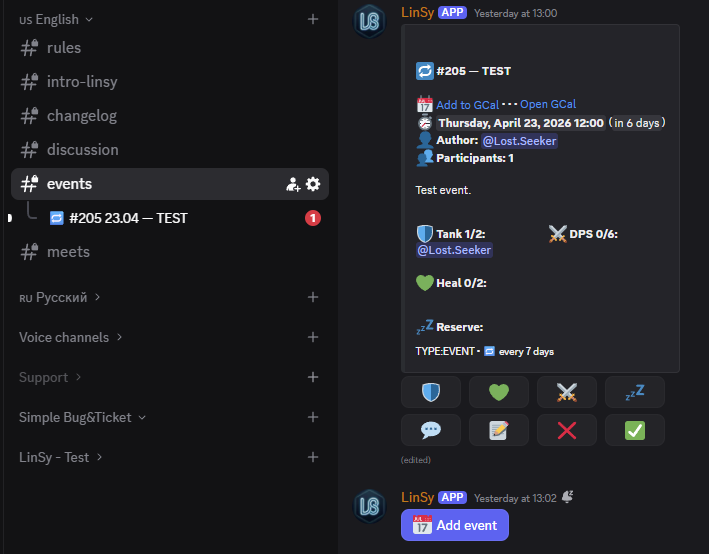
Use /create — a quick form will appear. Fill in the title, date, and optionally a description.
Date format: DD.MM HH:MM — Discord will automatically show each user their local time.
Events can be scheduled up to 30 days in advance.
🔔 Signing up
Click the button below the event card to sign up.
If the channel has roles configured (e.g. 🛡️ Tank, 💚 Healer, ⚔️ DPS) — click the role you want.
Click the same button again to cancel your signup.
💬 Comment (Premium)
Press 💬 to add a short comment to your signup. Any signed-up participant can leave a comment — it will be visible to everyone on the event card.
🖱️ Context Menu (right-click → Apps)
Right-click any event card to access: Delete, Edit — works in channels, threads, and search results.
Confirm Participants and Comment are available with Premium.
📬 /me (Premium)
Get a summary of all your upcoming signups sent directly to your DMs.
✏️ Editing & deletion
The event author can edit (✏️) or delete (❌) their own event at any time.
---
For Administrators
⚡ Recommended: Quick Setup
The fastest way to configure the bot — run /set_server action:quick_setup (or click the button in the welcome message). Walks you through language, timezone, events channel, schedule channel, and finishes with the right defaults — all in one ephemeral menu.
⚙️ Manual Setup
Grant the bot the following permissions in the event channel:View Channel · Send Messages · Embed Links · Attach Files · Send Messages in Threads · Create Public Threads · Manage Threads · Manage Channels · Manage Messages · Bypass Slowmode · Read Message History · Create Instant Invite
Then:/set_server action:timezone number:3 — set the server timezone (e.g. 3 for Moscow, -5 for New York). Default is UTC+0./set_channel action:roles — designate the current channel as an event channel and (optionally) pick a category/preset.
🌐 Server Settings — /set_serveraction:status — show server settings.action:language — set the bot language (en / ru).action:timezone number:3 — set the server timezone.action:logs — receive the server event log for the last 48 hours via DM.action:event_delete number:42 — force-delete an event by ID.action:clear — remove all bot event messages in the current channel.action:quick_setup — launch the guided Quick Setup wizard.
📢 Channel Settings — /set_channelaction:status — show all settings for the current channel.action:roles — configure the current channel as an event channel; pick a category or save without a category for plain signup.action:schedule — hide/show this channel in the schedule.action:threads — toggle auto-created discussion threads. (Premium)action:incognito — toggle incognito mode (hide participants). (Premium)action:announce — set announcement role for new events. (Premium)action:event_delete — delete an event by ID (must be in its channel).
🔘 Button Settings — /set_buttonaction:show_status — show button settings.action:sticky_button — toggle the sticky create button on/off.action:sticky_permission — restrict who can use the sticky button (by role).action:toggle_sub_buttons — show/hide management buttons under event cards. (Premium)
🔊 Voice Settings — /set_channel_voice (Premium)action:status — show voice channel settings.action:voice_temp — toggle temporary voice channels (auto-created 15 min before events).action:voice_fixed — link a permanent voice channel to this event channel.action:voice_off — disable voice integration.
🛠️ Other Commands/set_schedule — designate a channel for the automatic event schedule feed. (Premium)
🎟️ Promo codes
Got a promo code from us? Send /premium CODE GUILD_ID directly to the bot in DMs — works only if you're an Administrator on the target server.
💡 Useful to Know (Premium)
In the edit modal, the event author (or admin) can manually add or remove participants by entering their ID or @username.
To transfer event ownership, use the field: author:USER_ID
Example: author:235085133500252160
---
🆘 Support & feature requests: https://discord.gg/5qUHy3za7K
🗳️ Vote on top.gg every 12 hours — earn a free Premium code after 10 votes!
Språk
- English
- Русский
Funksjoner
- Pricing Free (optional paid extras)
Anmeldelser
Logg inn — Logg inn for å skrive en anmeldelse.
Ingen anmeldelser ennå — bli den første til å dele opplevelsen din.
Stemstatistikk
Registrert i denne katalogen de siste 30 dagene.
Siste 30 dager
- Stemmer
Ingen stemmer her de siste 30 dagene.