
Om
A highly modular Discord bot for creating, viewing, and maintaining user profiles.
Profile
Profile is a powerful Discord bot used to help handle storing user-filled forms
in your servers.
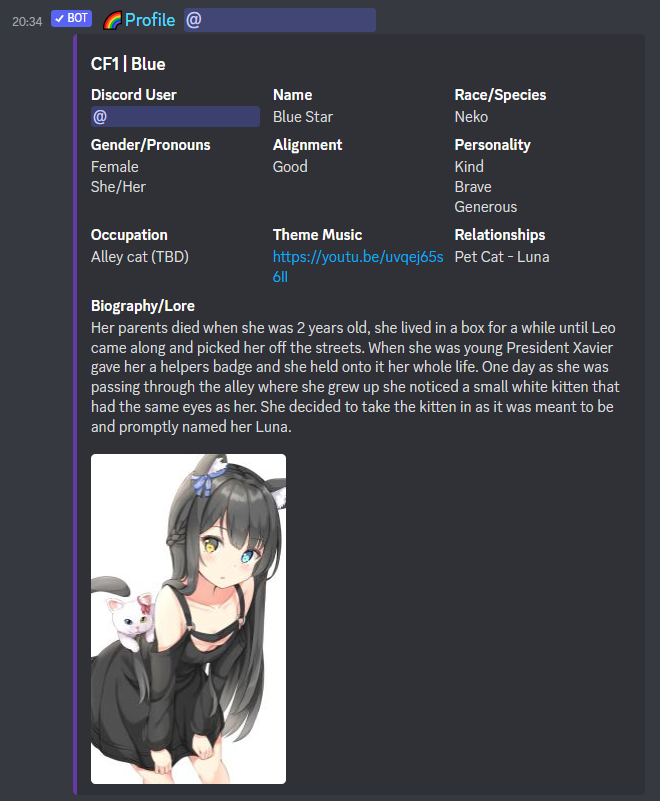
What does it do?
With Profile, a server's moderators are able to create, modify, and manage
different forms for users to fill in. Systems like this are a great help to
a variety of communities - from storing character sheets in roleplay
servers, to storing your fantasy football team, to just making moderator
applications within your server.
Using Profile gives you automated flexibility - roles can be assigned to people
after profiles are verified. Profiles can automatically fill in values based
on current user roles. Don't worry about explicit language either; you can set
up Profile so that user profiles need to be verified by your moderator team
before they can go public.
How do I use it?
There are two main parts to Profile - the moderator side (setting up and
managing templates) and the user side (filling in created templates in a
server).
Managing templates
By default, these commands require the manage guild permission. You can
change this in your server's integrations settings, however.
/template create [name]- This will create a new template that users can fill in.
/template edit [name]- From this you can edit the attributes of the template - fields for the
users to fill in, role to be assigned, locations where verification and
archiving takes place, etc.
/template delete [name]- This will permanently delete the referenced template, and all associated
profiles.
/template list- This will list the templates for your server.
Managing profiles
Profiles are the user-facing side of Profile. Users can fill in the templates
that you have created.
For the purposes of this example, we're going to assume that your created
template has the name "character".
/character create- This will set up a profile under the template for you.
/character get- This will give you a list of your profiles in that template.
- If you provide a user, it will give you a list of their profiles
instead.
/character edit [name]- This will let you edit one of your profiles.
/character delete [name]- This will delete one of your profiles.
Managing profiles for other people
Sometimes you may want to manage profiles for other people, forcibly editing or
deleting something for another user. There are commands in place to help with
that!
/template manage create [template] [user]/template manage edit [template] [user] [name]/template manage delete [template] [user] [name]
Språk
- English
- Français
- Deutsch
- Português (Brazil)
Recensioner
Logga in — Logga in för att skriva en recension.
Inga recensioner ännu — bli först med att dela din upplevelse.
Röststatistik
Registrerat i den här katalogen de senaste 30 dagarna.
Senaste 30 dagarna
- Röster
Inga röster här de senaste 30 dagarna.
