
Giới thiệu
Moderation specialized bot. Deep case system with files, built-in appeals with chat, auto-mod, ticket system, see deleted files, and more…
-
-
-

📚 Track Messages
🗃️ Track Images
📄 Appeal System
💬 Appeal Live-chat
🎫 Ticket System
📫 Report Messages
🚩 Report Users
🤖 Auto-Mod
🏳️ Auto-Mod Templates
📎 Case Files
📁 Cases
📂 Case Entries
🗑️ Purge Messages
📦 Track Purges
🔍 Member Tracking
🗳️ Vote Delete
🏗️ Server Setup Help
📛 Block Specific Images
Personal Dashboard 🩵
Useful for all
Archivian is also a platform your users can use. Using their Discord, they can browse cases on them from any server, create appeals directly, and more.

The normal stuff
Common features
Like bots you are used to, it comes with ability to create cases on users, in addition to notes.
-
Bans
-
Kicks
-
Timeouts
-
Warnings
-
Notes
Not like other bots
Novel features
An out-of-the-box appeal system with built-in livechat. Track bulk deletes and deleted files. Multiple entries per case. Case files. And more.

Looking for something?
Explore features
-->
Ticket System

Let users create tickets with your staff
- Create multiple types of tickets
- Create portal messages with a button users can click to start a ticket
- Creates new private channels per ticket in a category
- Add users to ticket channel
- Close tickets, making it read only, re-open at any time
- Archive tickets to delete the channel and store the conversation
Message Purging
Bulk-deletion of messages in your server
- Target a specific channel, or perform a global purge
- Use filters to limit messages to be deleted: from user, content pattern, specifically with or without files, max messages, between two message IDs, until message by ID, and more…
- Test deletion to make sure your filters are correct. See messages that would match
- Deleted messages stored in a dedicated message collections for reviewing later
Reporting System
Report users or specific messages to staff
- Simple right-click menu on users/messages to report them
- Create your own types of report reasons
- Optionally prompt user with modal to fill in more details
- Enable detailed tracking of members that are reported
- Store state of messages when they are reported, and tracks every change made to it, for complete history
Message & File Tracking
Detailed, accurate, long-term, and complete tracking of messages
- Browse files that were removed from messages, whether the message was deleted or the file removed
- Detect whether text was edited or removed, files removed, embeds replaced; not just if messages text deleted or edited
- Context-specific tracking: set exceptions for very specific scenarios, down to a precision like "store if sent in channel, member has this role, and it is this user"
- Tracking policy per type of event: message created, message edited, message deleted
- Set file and message tracking and retention period per context
- Enable anonymization of messages: store all details except the author ID
See Deleted Files
A powerful addition to message tracking
- Archivian keeps a copy of files uploaded for up to several months[1]
- When files are deleted, you can see which ones in a dedicated view
- Detect whether the file was removed or the message was deleted
[1] Configurable up to 3 months after creation, and up to one month after deletion
Powerful Case System
The most powerful case system of any bot
- Use it like any other bot's case system. Leverage its super-powers when you need it
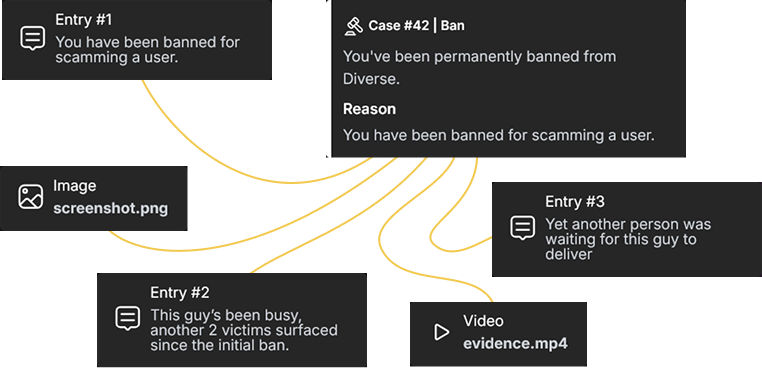
- Collaborate with staff on cases with multiple entries per case instead of just a fixed reason
- Automatically detect bans, kicks, and timeouts created by other means, and generate cases from it[1]
- Attach files directly to cases, useful for storing proof or whatever you like
- Detailed tracking of edits to the case
- Link cases to each other with a label, like a related ban or a warning before a timeout
- Link other uses to cases with a label, like a victim of a scammer that got banned
- Show/hide cases, entries, and files to the user so they can re-visit the case any time in their own personal dashboard[2]
- Archive cases that should no longer be visible, but should be kept for record purposes
- Incredibly flexible settings per type of case
- See recent cases made on the user when you create cases on them
- Create custom tips/info for your staff per type of case, e.g. a reminder to attach proof when a ban is created
- Use pre-made tips for staff when they create cases, teaching and informing them of the possibilities
[1] Configurable per type of moderation action. Detect stuff from other bots or even when using native Discord UI
[2] Control visibility with defaults, overrides per case, and overrides per entry and file
Appeal System
Out-of-the-box appeal system on top of the case system
- When users get alerted, they can create appeals with the click of a button[1]
- Appeals are linked to cases, so you can see them directly when browsing cases
- Built-in livechat on the website dashboard, so staff and appealing user can chat in real-time
- Assign appeals to staff, granting them full access to the appeal and full read access to the associated case
- Reject or approve an appeal, to automatically undo if approved (unban, lift timeout)
- Let users use Archivian for appealing bans on their account from before you started using Archivian[2]
- Control the ability to appeal per type of case, with a possibility of overrides per case
- Allow or disallow further appeals when rejecting an appeal
[1] Configurable per type of case
[2] Configurable via case settings
Browse Cases on Yourself
A unified dashboard showing all the cases made on you from all servers.
- Users can log in with their Discord account and have their own personal dashboard
- Here they can see cases on them from all servers, appeals they created, and more[1]
- Create appeals directly from the case they are browsing
[1] If Archivian was used, and if the server lets them see it
Discord Auto-Mod Templates
Browse and manage templates for Discords own Auto-Mod system
- Browse public templates. Subscribe to templates and receive auto-updates, either automatically or with a simple update button
- Create your own Auto-Mod templates from your personal dashboard and re-use in all your servers…
- … or create unique templates that the server itself owns, so it is not bound to specific users
- Publish your templates for the world to see and import for their own use
- Create copies of templates you like and adjust them to your own needs
- Import your existing Auto-Mod rules with ease
- Create and maintain multiple templates that can lay dormant until you need it (since Discord allows max 6 at a time)
Archivian Auto-Mod
An Auto-Mod system that covers what Discord does not
- Always ignores messages by your own staff
- Create exceptions per channel or for members with specific roles
- React with sending a message, by replying to user, DM them, and/o
Ngôn ngữ
- English
Tính năng
- Pricing Free
- Web Interface Yes
- Audit Logs Yes
Đánh giá
Đăng nhập — Đăng nhập để viết đánh giá.
Chưa có đánh giá — hãy là người đầu tiên chia sẻ trải nghiệm.
Thống kê phiếu bầu
Ghi nhận trên thư mục này trong 30 ngày qua.
30 ngày qua
- Phiếu bầu
Không có phiếu bầu nào ở đây trong 30 ngày qua.


