
關於
📞 Cross-server phone calls, group calls & hubs. Call any server, build communities, grow together on Discord
A Bridge for Your Discord Server
InterChat connects multiple Discord servers into shared chat spaces called hubs and *calls**. Members from different communities can talk, call, and share moments together as if they were in one large room.

Calls & Group Calls
InterChat now brings calls into your server.
/callto start a private 1:1 text call with someone in the hub./groupcallto open a group call with up to 5 people./hangupto end your call gracefully./skipto move on to the next person.
All calls run through our own infrastructure. No data leaves our servers for voice routing, and our experimental AI safety detection runs entirely locally to keep conversations clean without compromising privacy.
GIFs work seamlessly in calls, and intuitive replies let you respond naturally even when voices are flowing.
---
Fun & Engagement
Make calls & hubs playful with built in social commands:
/pat,/hug,/slap, and more to react to messages with personality.- Achievements to grind and collect (coming soon).
---
Hubs
You can create hubs or join existing ones. If this is your first time, we recommend starting by joining one to see how everything feels.
Step 1: Find a Hub
Visit to browse community hubs.
Click Explore Hub on the one that catches your eye.
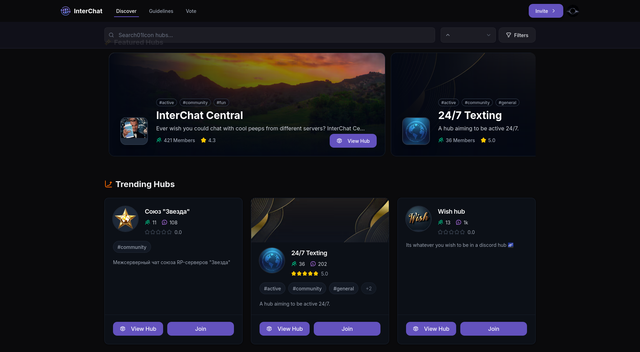
Step 2: Join the Hub
- Browse hubs on the discovery page.
- Click Explore Hub.
- Click Join.

- From the dropdown, select Copy Discord Command.
Step 3: Paste the Command
Find or create a channel dedicated to the hub. Paste the command into the chatbox (Ctrl + Shift + V), select the command that appears, and run it.

Step 4: Start Talking
All done. Send a message, make a call, or drop a GIF. Have a wonderful conversation.
---
Want to Create a Hub?
We have a guide just for that here. Take a look.
What Makes a Hub Special
Each hub comes with extensive customization out of the box. The goal is to make every connected server feel at home while still sharing a common space. Think of it as a Discord server inside a Discord server. Hubs act as shared chatrooms, or even cross server forums, where members from multiple communities can communicate harmoniously.
If you have any questions, concerns, or just want to hang out, please join our Discord server. We would be thrilled to have you.
Feel like something could be added or changed? Leave feedback in our Discord server. We are really looking forward to hearing about your experience with us.
語言
- Português (Brazil)
- 简体中文
- Русский
- Estonian
- हिन्दी
功能
- Pricing Free (optional paid extras)
- Web Interface Yes
- Installable as User App Yes
評價
登入 — 登入後即可撰寫評價。
尚無評價 — 來分享你的體驗吧。
投票統計
本指南過去 30 天記錄的資料。
累計總數可能包含其他指南匯入的票數。圖表只顯示本站投票。
最近 30 天
- 票數
最近 30 天這裡沒有投票。