
What this bot brings to your server
Notify your Discord when a Streamer goes live on Twitch
Twitch Only!
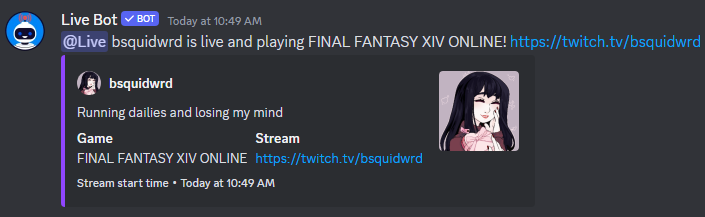
Start Monitoring a Stream
- Run
/perm-checkto have the Bot run a check for permissions.
- Start setting up a monitor
/monitor create profile-url:https://twitch.tv/bsquidwrd where-to-post:#live role-to-mention:@everyone
- If you want to customize the live message (see below for parameters), add in the
live-messagepart of the slash command (can always edit this later too)
- That's it!
Stop Monitoring a Stream
- Run
/monitor delete profile-url:https://twitch.tv/bsquidwrd
- That's it!
List Streams that are being monitored
/monitor list
Check if the Bot sees a Stream as Live
/monitor check profile-url:https://twitch.tv/bsquidwrd
Get a link to my Support Server
/help
Message Parameters
The below parameters will be replaced at the time of Notification
{role}= The role that you setup to be pinged (if applicable)
{name}= The display name of the Streamer
{game}= Game being played at the time of going live
{url}= Link to the stream
{title}= Stream title at the time of going live
Languages
- English
Features
- Pricing Free
Community reviews
Log in — Sign in to write a review.
No reviews yet — be the first to share your experience.
Vote statistics
Recorded on this directory over the last 30 days.
3
Votes this month
3
All-time votes
0
Last 7 days
0
Unique voters · 30d
Displayed totals can include imported votes and administrative adjustments. The graph shows vote records on this site, including automated votes.
Last 30 days
- Votes
No votes recorded here in the last 30 days.


