
What this bot brings to your server
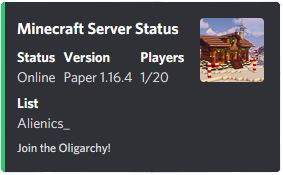
A Minecraft Server Status Panel. Steve provides an easily accessible and well-displayed status panel for your server.

Steve.
A Minecraft Server Status Panel
---
Steve is a Discord bot that tracks your Minecraft servers. Built in the Node.js environment and the discord.js library, Steve aims to provide an easily accessible and well displayed status panel for your server.
Invite
Invite Steve to your Discord server. Run /setup and follow the setup instructions.
- In your
server.propertiesfile, setenable-querytotrueand restart the server. /setup ip| Set the server IP (URL also accepted)/setup port| Set the server port (Default 25565)/setup name| Give your server a name/setup footer| Set a footer message for your status panel
Setup is complete! Run /status to display the server status panel. More commands can be found by typing /help in your Discord server.
Languages
- English
Community reviews
Log in — Sign in to write a review.
No reviews yet — be the first to share your experience.
Vote statistics
Recorded on this directory over the last 30 days.
0
Votes this month
0
All-time votes
0
Last 7 days
0
Unique voters · 30d
Last 30 days
- Votes
No votes recorded here in the last 30 days.


