
关于
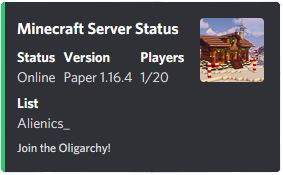
A Minecraft Server Status Panel. Steve provides an easily accessible and well-displayed status panel for your server.

Steve.
A Minecraft Server Status Panel
---
Steve is a Discord bot that tracks your Minecraft servers. Built in the Node.js environment and the discord.js library, Steve aims to provide an easily accessible and well displayed status panel for your server.
Invite
Invite Steve to your Discord server. Run /setup and follow the setup instructions.
- In your
server.propertiesfile, setenable-querytotrueand restart the server. /setup ip| Set the server IP (URL also accepted)/setup port| Set the server port (Default 25565)/setup name| Give your server a name/setup footer| Set a footer message for your status panel
Setup is complete! Run /status to display the server status panel. More commands can be found by typing /help in your Discord server.
语言
- English
评价
登录 — 登录后即可撰写评价。
暂无评价 — 来分享你的体验吧。
投票统计
本指南过去 30 天记录的数据。
0
本月投票
0
累计投票
0
最近 7 天
0
独立投票人 · 30 天
最近 30 天
- 投票
最近 30 天这里没有投票。


